
The meeting was in the office of a sales director at a distributor in Monterrey. He had two presentations open on his laptop: one from HubSpot, one from Salesforce. He liked both. Both had a price that looked nothing like anything he could compare. He asked me, "Which one is right for me?" I answered with another question: "Who is going to administer this on day 90?" He went quiet for a while.
That question decides more than any feature table. Here is how to compare HubSpot vs Salesforce when you are a mid-sized company in Mexico: what it really costs to own, how hard it is to get your team to use it, and who each one is for. If you don't yet know what to look for, read the best CRMs for companies in Mexico first, where I compare six options. This piece is narrower: two tools, one criterion.
The cost is not the license
Both charge per user and per tier. Both have tiers that climb fast. As of November 2026, according to their sites, HubSpot offers a free CRM and paid tiers by "Hub" (sales, marketing, service), while Salesforce sells by edition, from the most basic to the most complete. I am not giving figures because they change every quarter and because they are not what will surprise you.
What surprises you is everything around the license. When someone asks me to compare total cost, I build this list:
- Licenses. How many users for real, not how many "could" join. A rep, a manager and the director don't pay the same or use it the same.
- Implementation. HubSpot is usually configured by your own team or a consultant over a few weeks. Salesforce almost always calls for an implementer, sometimes one per project.
- Administration. Someone has to change fields, build reports and add users. In HubSpot that can be the sales manager with a free afternoon. In Salesforce it helps to have a person who owns that responsibility, even part-time.
- Add-ons you didn't ask for. Both have features billed separately: automation, advanced reporting, e-signature, sales intelligence. They get added one by one and the invoice changes.
- Exit. What it costs to leave. Exporting your data cleanly should be possible in either; ask how before you sign.
With that list, the comparison changes. For a team of 8 reps, Salesforce's cost is rarely in the license. It is in the hours of whoever administers it and in the consultant.
Adoption curve: this is where you win or lose
A CRM the team doesn't use costs the same as one they do. And the question I care about most isn't what the tool can do but how fast a rushed rep can log a call.
HubSpot wins on that almost every time. The interface is clear, entry is short and a new rep gets it in a couple of days. Its risk is the opposite: because it is easy, everyone leaves it their own way, and six months later you have three ways of filling in the same field.
Salesforce is stricter and more powerful. It demands that someone decide beforehand what the stages are called, which fields are required and who sees what. If that person exists, you get an orderly system that lasts for years. If not, you get a system that is orderly on paper and empty in practice. I wrote about why teams abandon the CRM and how to avoid it in how to implement a CRM without your team abandoning it.
The side-by-side comparison
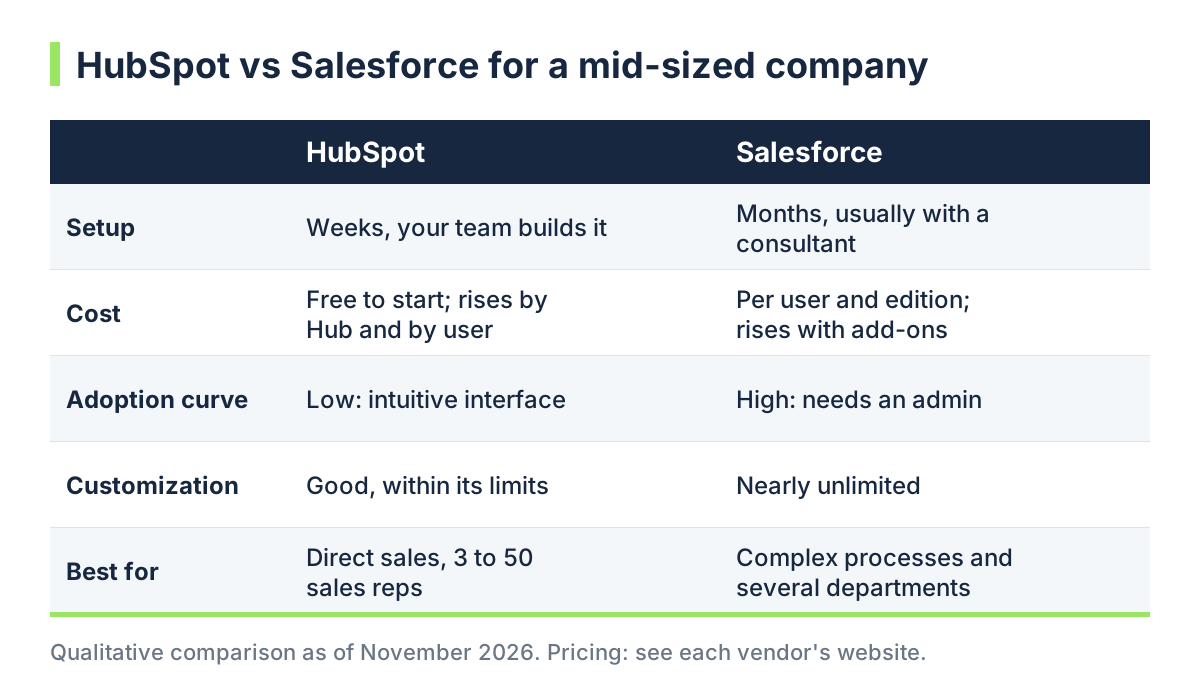 HubSpot vs Salesforce for a mid-sized company: qualitative comparison
The table has no prices for one reason: they depend on your number of users and the modules you pick, and any figure I gave you would be stale within a quarter. Ask each vendor for them in writing, using your real scenario.
Who each one is for
HubSpot fits you if:
- Your sales team is 3 to 50 people and the sales process is direct: prospect, quote, close.
- You want marketing and sales to see the same thing, with website forms, email and ads tied to the same contact.
- You have no one dedicated to administering the CRM and won't hire one this year.
- You want to start in weeks and adjust later.
Salesforce fits you if:
- Your process spans several departments, approvals, configurable products or territories, and you need the system to respect that.
- You already have, or will have, someone in that administrator role.
- You need to connect the CRM to an ERP or in-house systems and want total freedom to do it.
- Your company will grow in departments and users, and you would rather pay for the complexity now than migrate later.
A typical case: a mid-sized industrial services company with 12 reps and a single quote per customer. That team rarely needs Salesforce. Another case: a manufacturer with three divisions, customer-specific price lists and a discount approval process. There, HubSpot falls short sooner than it seems.
Three questions before you sign
When a director asks me for a recommendation on a single page, I leave these three questions. If he answers all three without hesitating, the decision is already made.
- Who owns the CRM? A person with a name, not "the sales department". That person decides stages, fields and permissions, and is the one who says no when someone asks for one more field.
- Which number will you look at every Monday? If you can't name it, the CRM will be an expensive filing cabinet. If you can (open opportunities by stage, days without contact, source of each sale), you know what must be captured no matter what.
- What happens if your star rep leaves? With a well-filled CRM, their accounts stay and get reassigned. With a half-filled CRM, they walk out with them. That is the real reason to pay for one, and both tools deliver it if they are used.
The mistake I see most often
Choosing by the demo. The demo is always full of pretty data, dashboards someone built for weeks and features you won't use in year one. No demo shows you what a regular Monday looks like with 400 badly captured contacts.
Before deciding, run a one-week test with two real reps, using their real customers, in each tool. Measure one thing: how long each takes to log a call and set the next task. The tool where they do it without being asked is the one that will survive.
It also helps to have the process clear before opening any account. If your sales stages aren't written down, no tool will fix that; the sales pipeline and its metrics is the starting point, and the CRM only makes it visible.
And if you still doubt
There is a third route almost no one considers: start with the free version of HubSpot, use it for three months with clear rules and decide with data. If in that time you hit real limits, you know what to pay for. If you don't, you saved a license you were not going to use. On when free is enough and when it isn't, I wrote free or paid CRM.
At De Marketing we are our clients' digital marketing department and we run it with the Método Sísmico, four steps so you know where each sale comes from. The CRM is where that source gets stored, so the tool matters less than the discipline of filling it in.
If you want to review your case with someone who sits next to you and looks at your numbers, start with the Levantamiento and we will leave the meeting with a written recommendation.
Related services
Want to implement this in your company?
Leave your website and within minutes you'll get a reading of your marketing by email: step 1 of the Método Sísmico.
Start your Levantamiento