
The owner of a service company in Monterrey handed me her Google Ads report in a meeting. Two hundred clicks a week, a reasonable cost per click, a chart going up. "I should be happy, right?" she said. I asked how many people had called or filled out the form that week. She went quiet and opened her email to count them by hand. Four. Two were a vendor selling logo design.
That's the pattern. With Google Ads for service companies, the platform rarely fails. Four configuration decisions fail, over and over, account after account, and they cost money every day without anyone noticing. I'll walk through them in the order I usually find them, with the fix for each.
Mistake 1: broad match with no negative keyword list
Broad match tells Google to show your ad on any search it considers related to your keyword. With today's automated bidding it can work well, but only if Google has good signals and you close the door on what you don't want.
In a service company it looks like this. You sell "industrial maintenance" and your ad shows up for "industrial maintenance course," "maintenance technician job," or "maintenance manual pdf." Those people click, you pay, and none of them will ever hire you.
How to fix it:
- Open the search terms report and read it in full. Not the summary: the actual searches, one by one.
- Add as negatives the words that give away someone who won't buy: job, vacancy, course, free, pdf, manual, salary, what is.
- Do it weekly for the first month and monthly after that. The negatives list is an asset that grows.
- If you have no conversion history, start with phrase or exact match and open up to broad only when Google has real contacts to learn from.
Mistake 2: measuring clicks instead of contacts
Clicks are the easiest thing to report, which is why they're what gets reported most. But a click isn't an interested person. It's a person who tapped an ad, sometimes by accident.
Here's an example with hypothetical numbers, just to see the logic. Imagine two campaigns with the same budget:
| Example (hypothetical numbers) | Campaign A | Campaign B |
|---|---|---|
| Clicks | 400 | 150 |
| Real contacts | 4 | 9 |
| Cost per click | Low | High |
| Cost per contact | High | Low |
If you only look at clicks, campaign A seems better. If you look at contacts, B wins by a wide margin. And when you tell Google to optimize for clicks, you're asking it for more people who click, not more people who hire you.
How to fix it: define what a contact means for your business (a submitted form, a call of a certain length, a WhatsApp message) and set it up as a conversion. Then go one step further: how many of those contacts were real prospects and how many ended up buying. That's where the number that matters comes from, and I explain it in more detail in how to lower your cost per lead without losing quality.
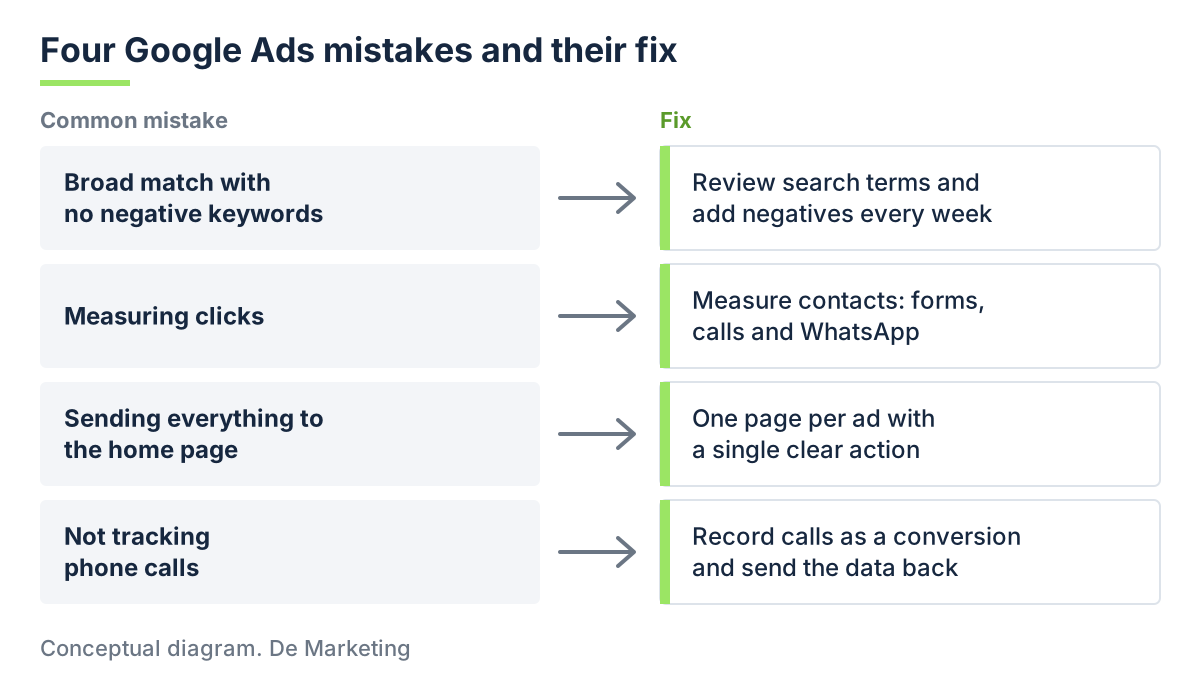 Each Google Ads mistake with its fix.
Mistake 3: sending all traffic to the home page
You pay for a click that promised something specific. The ad said "Industrial electrical installation review" and the visitor lands on your home page, with a photo carousel, a menu with eight options, and a sentence about your mission.
The person was looking for one thing and now has to figure out where it is. Most don't. They leave.
How to fix it: each ad group should lead to a page that repeats what the ad promised, explains in a few lines what you do and how you work, and offers one clear action. A short form, a call button, a WhatsApp button. No navigation menu inviting people to leave.
What works best for services:
- A headline that matches the search.
- What the service includes and who it's for.
- Proof you're trustworthy: years in operation, type of clients (no names unless you have permission), certifications.
- A form with few fields. Name, phone, what they need.
I have a full guide on building them in landing pages that generate leads.
Mistake 4: not tracking phone calls
In many services the sale starts with a call. The owner of a shop, a clinic, a construction firm, a law office: the prospect wants to hear someone before leaving their details in a form. If your campaign generates calls and nobody measures them, your report says "few contacts" when in reality many came in.
And the other way around: without measuring calls you don't know which ads cause them, so you can't improve them.
How to fix it:
- Turn on the call extension in your ads with your number, and set Google to record as a conversion the calls that last longer than a certain time. You decide how many seconds count as a serious call.
- If your phone number is on your site, install website call tracking, so you know which ad started each one.
- Record WhatsApp clicks as an event. Careful: a WhatsApp click isn't a confirmed contact yet, so give it a lower value or count it separately.
- When someone calls, note in a sheet or in your CRM where they came from and whether they were a real prospect. Once a week, send that data back to Google as imported conversions. That way the platform learns from the good calls, not just the longest ones.
How to tell if your account has these mistakes today
You can check in one afternoon, without hiring anyone:
- Open the search terms report for the last 30 days and count how many have nothing to do with your service.
- Check in "Conversions" what you're counting. If it says only "site clicks" or "page views," you're measuring wrong.
- Click your own ad from your phone and notice where you land.
- Dial your own number the way a customer would and confirm that someone answers and logs it.
If you find two or more, you already have a work list for this week. To see how your cost compares with what's normal in the market, this guide to Google Ads and cost per lead in Mexico helps, and for the full structure of a healthy account, the Google Ads guide for companies.
What you take away
The four mistakes have the same root: Google Ads does exactly what you ask, and we almost always ask for the wrong thing. We ask for clicks and it gives us clicks. If you ask for contacts from people who actually buy, it starts looking for them.
We see this daily at De Marketing, which works as the digital marketing department of our clients: the first thing we do when reviewing an account is measure contacts and where they come from, using the Sísmico Method, so you know which ad brought each sale.
If you'd like us to review your account with you and tell you which of these mistakes it has, book a Levantamiento. We do it with your real numbers, no commitment.
Related services
Want to implement this in your company?
Leave your website and within minutes you'll get a reading of your marketing by email: step 1 of the Método Sísmico.
Start your LevantamientoRelated articles